Guide · Basics
Names and nameplates
Who is who, and how to keep an eye on them
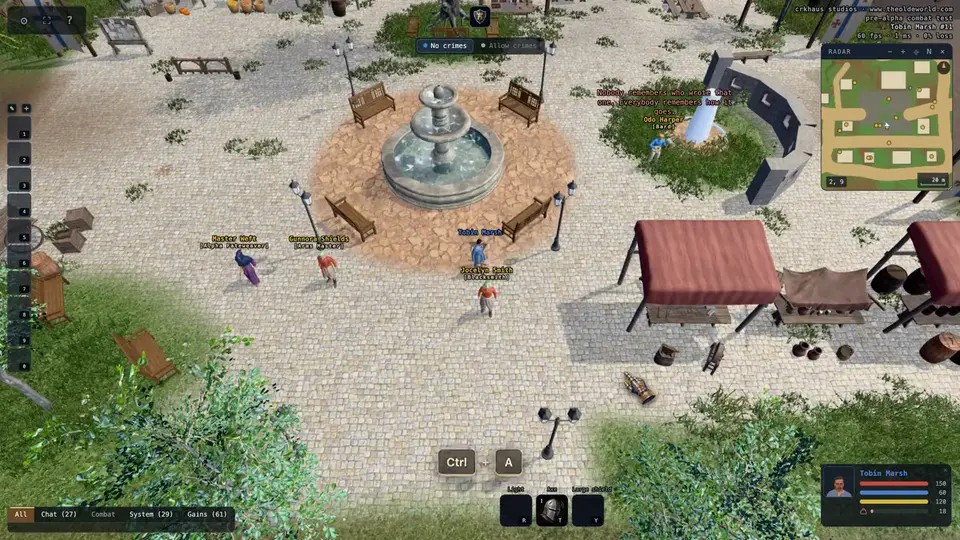
Name colours
A name wears the colour of its reputation, as YOU see it. The same person can be blue to one player and grey to another.
- Blue
- innocent. Attacking them is a crime.
- Grey
- criminal, or someone who wronged you. Fair game.
- Red
- murderer. Fair game everywhere.
- Gold
- untouchable: shopkeepers, guards, staff.
- Green
- your own pets and summons.
Nameplates and health bars
Out of war, a single click on anyone floats their name for a moment. Drag a character and their nameplate tears out: a portrait, their name and their health, pinned to the screen. Your own plate shows all three of your vitals.
Drag a plate next to another and it docks into a stack. Right-click a plate to close it. Right-click a character for a menu: their paperdoll, or a nameplate without the drag.
Hold Ctrl (or ⌘ on a Mac) and drag a box over the world with the left button: everyone in it lights up, and when you let go their nameplates open in one stack beside the box, nearest first. A plate already open joins the stack instead of opening twice. The key is Box select under Controls in the gear menu.
A small health bar hangs under the monsters that attack on sight, whatever you are fighting and whoever is fighting you. Under Interface on the Video page of the gear menu you can show one under every creature and townsperson instead, only under your target, or none at all.
- Click
- float a name (peace only)
- Drag a character
- tear out their nameplate
- Right-click a character
- paperdoll and nameplate menu
- Ctrl + A
- show every name in view
- Ctrl
- hold and drag a box: everyone in it gets a nameplate
- H
- show a health bar under everyone in view